
Successful LMS transitions are decided by change management, not features. Run a readiness assessment and pilot before you migrate anything. Name an executive sponsor, pick a pilot cohort of a moderate share of trusted users, and build a 30/60/90 adoption plan before go-live day arrives. Skip that sequence and you'll launch a platform nobody actually uses.
TL;DR:
- A successful LMS transition depends on a structured change management plan, including a readiness assessment, pilot, phased migration, and governance checkpoints.
- The 30/60/90 adoption framework emphasizes active activation, expanded engagement, and ongoing optimization over the first three months.
- Clear ownership involves executives, LMS owners, IT leads, and champions, with managers playing a crucial role through enablement and regular reporting.
- High adoption requires early communication, quick wins, microlearning, and tracking metrics like active user percentage, completion rates, and voluntary enrollment above 15% by day 60.
- Common pitfalls include neglecting post-launch efforts, overloading content at launch, skipping pilots, and ignoring user feedback on relevance and friction points.
Table of Contents
- What Is Change Management for LMS Implementation?
- Building a Phased Change-Management Framework
- The 30/60/90 Adoption Playbook
- Who Owns What: Stakeholders and the Champion Network
- Data Migration and Content Audit Checklist
- Getting Communication and Onboarding Right
- Measuring Adoption: Metrics That Actually Predict Success
- Common Mistakes That Sink LMS Transitions
- Why Microlearning Accelerates LMS Adoption
- Where Leaderly Fits Alongside Your LMS Rollout
- Sources
- FAQ
What Is Change Management for LMS Implementation?
Change management for LMS transitions is the set of deliberate steps that get people to actually use a new platform, distinct from the technical work of installing and configuring it. Implementation is its job: migrating data, setting up integrations, testing single sign-on. Adoption is everyone else's job, and it's the part most projects underfund.
The distinction matters because LMS adoption strategy work has to start weeks before go-live, not after. Communication, manager enablement, and structured learning pathways all need lead time. Wait until launch day to think about adoption, and you're already behind.
Poor adoption isn't a soft problem. It shows up as:
- Licensing spend on seats nobody logs into after month one
- Compliance modules left incomplete, creating audit exposure
- Managers reverting teams to spreadsheets or the old system out of frustration
- IT tickets piling up because nobody trained end users on basic navigation
Resistance rarely comes from one source. Admins resist when the new system adds manual workarounds their old one didn't need. Managers resist when reporting is harder to read or slower to pull. Learners and faculty resist when the interface feels unfamiliar and nobody explained why the change was worth the friction. Each group needs a different answer, which is why a single generic "here's your new LMS" email almost never works.
In higher education specifically, the stakes run higher. LMS transitions touch shared governance structures, faculty autonomy, and course continuity across departments that don't answer to a single manager. Ellucian's change management guidance frames these as institution-wide transformations requiring inclusive governance, not IT rollouts with a training email attached.
Building a Phased Change-Management Framework
A phased framework turns "we're switching platforms" into a sequence with checkpoints, owners, and a clear point where you can stop and fix something before it becomes expensive.
- Readiness assessment. Before anything moves, someone (usually the LMS owner, with input from IT and HR or the registrar's office) audits current usage patterns, integration dependencies, content volume, and stakeholder sentiment. The checklist should cover data quality, SSO readiness, existing content inventory, and a short survey of manager or department-head expectations.
- Pilot selection and duration. Choose a cohort representing 10 to 15 percent of your total user base, drawn from teams or departments known for engagement and vocal feedback. Running a pilot with trusted, high-trust groups surfaces configuration problems early and generates the kind of authentic early-adopter stories that make launch communications credible instead of generic. Run the pilot for several weeks, long enough to see repeat logins, not just curiosity clicks.
- Phased migration. Move through sandbox testing, then the pilot cohort, then a soft launch to one or two additional departments, and only then a full cutover. The five-step migration approach from Training Industry frames this as clarifying the why, auditing what actually needs to move, migrating in phases, communicating with empathy, and preparing for the inevitable surprise nobody flagged in planning.
- Governance checkpoints. At the end of each phase, someone with actual authority to delay launch reviews a short go/no-go list: Is data migration validated? Did the pilot hit its completion and login targets? Are there unresolved integration issues? A go/no-go checkpoint only works if someone can actually say no.
Treat each phase as a gate, not a milestone you note in a status update and move past regardless of what the data says. If the pilot cohort's completion rate is weak, that's information about your full rollout, not a fluke to ignore.
The 30/60/90 Adoption Playbook
The 30/60/90 framework separates a launch that produces a brief spike in logins from one that sustains usage past the first month. It breaks into three phases, each with its own job.
Days 1 to 30: Activate
- Send launch communications from the executive sponsor, not just IT or HR, so the message carries organizational weight.
- Track first-login rate daily for the first two weeks. Anything under 60 percent of eligible users by day 14 signals a communication or access problem, not a patience problem.
- Staff a visible support channel, whether that's a dedicated Slack channel, help desk queue, or office hours, so early friction gets resolved before it becomes a story people tell each other.
Days 31 to 60: Expand
- Give managers a simple report showing their team's login and completion status, updated weekly.
- Introduce light incentives, recognition in a team meeting, a completion badge, points toward an existing program, for people who log in without being told to.
- Set a voluntary enrollment target. This is the number that tells you whether people want to use the system or are only using it because they're told to.
Days 61 to 90: Optimize
- Run a formal adoption review comparing actual metrics against your original targets.
- Fix the two or three UX or content issues generating the most support tickets or feedback complaints.
- Set the ongoing reporting cadence, usually monthly, that will run for the life of the platform.
Sample KPIs worth watching: active users as a percentage of eligible users, completion rate on assigned content, time-to-first-login, and repeat logins over a rolling 90-day window. If a KPI misses target, don't just note it and move on. A weak completion rate usually points to content sequencing problems; a weak first-login rate usually points to a communication gap or an SSO friction point IT needs to fix immediately.
Who Owns What: Stakeholders and the Champion Network
Clear ownership prevents the most common failure in LMS transitions: everyone assuming someone else is handling adoption.
- Executive sponsor: sets the mandate, removes organizational roadblocks, and lends credibility to launch communications.
- LMS owner: manages the day-to-day rollout, owns the 30/60/90 plan, and reports progress upward.
- IT lead: handles technical readiness, SSO, integrations, and data migration validation.
- Champions: peer advocates embedded in departments or teams who answer basic questions and model actual usage.
Recruit champions from people already respected by their peers, not just people who volunteer. Expect a time commitment of two to three hours a week during the first 60 days: answering questions, demoing features in team meetings, flagging friction points back to the LMS owner. Managers equipped with dashboards and short talking points are consistently the highest-leverage lever for adoption in distributed teams, more effective than any all-staff email campaign.
Manager enablement doesn't need to be elaborate. A single 30-minute session covering how to pull a team report, how to answer the three most common employee questions, and how to escalate a technical problem is usually enough. Follow it with a monthly reporting cadence so leaders see adoption trends before they become adoption problems. For higher-education programs building out manager or department-chair enablement, an 8 to 12 week cohort structure can formalize that training rather than leaving it to a single walkthrough.
Pro Tip: Give every champion a one-page "answers to the five questions you'll get asked" sheet before launch week. It cuts their prep time to zero and keeps their answers consistent across departments.
Data Migration and Content Audit Checklist
Migration delays almost never come from the platform itself. They come from dirty data and unclear content decisions made too late.
- Audit user data before import. Check for duplicate email addresses, missing department or role fields, and inconsistent naming conventions. Cleaning data before import, not after, avoids the multi-week delays that come from re-running imports on a corrupted user list.
- Triage content into four buckets: keep as-is, update and re-tag, archive for reference only, or discard entirely. Most organizations discover 30 to 40 percent of their existing catalog isn't worth migrating.
- Define your minimum viable catalog. At minimum, that means one high-value, role-specific course per major audience segment plus any compliance modules due within the first 30 days. A thin, well-organized launch catalog beats a bloated one that buries the content people actually need.
- Prioritize integrations in order: single sign-on first, HRIS or student information system sync second, reporting and analytics connections third. A broken SSO on day one undoes weeks of communication work. Teams running into attribute mapping or SCIM provisioning issues during this step should treat SSO validation as a launch blocker, not a post-launch fix.
- Run user acceptance testing with real scenarios, not just admin checklists. Have pilot users complete an actual course, generate a report, and reset a password before you sign off on go-live.
Getting Communication and Onboarding Right
Adoption strategy work should begin before go-live, not the week of it. Building the communication plan weeks ahead of launch is what separates first-login rates in the 70s from first-login rates in the 30s.
- Pre-launch (four to six weeks out): Announce the change, explain the why in plain terms, and set expectations for what's coming. This message should come from leadership, not IT.
- Days-out messaging: Send reminder communications with specific dates, direct login links, and a named contact for questions. Repetition here matters more than creativity.
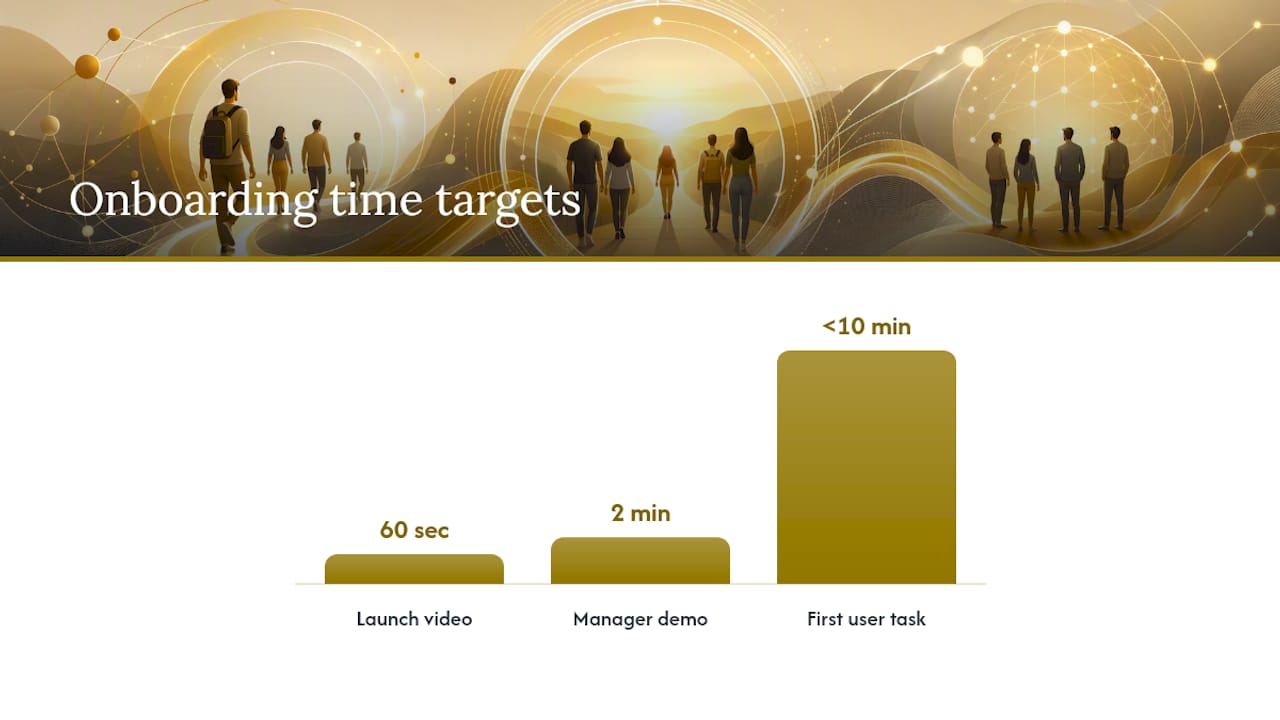
- Launch-day messaging: Keep it short. A single email or announcement with the login link, a 60-second video walkthrough, and support contact information outperforms a long explainer nobody reads.
Design onboarding around a fast, meaningful win. The first thing a new user does inside the platform should take under 10 minutes and produce something they can point to: a completed short module, a personalized dashboard, a badge. A confusing first 10 minutes is the single biggest predictor of someone never logging in again voluntarily. For onboarding sequences aimed at adult learners specifically, structuring the first experience around relevance and quick wins matters more than covering every feature.
Give managers a script for one-on-ones: three questions to ask ("Have you logged in yet?" "What's stopping you?" "What would make this easier?") and a two-minute demo they can run from their own laptop. Recommended cadence: one company-wide message weekly for the first month, then monthly after that, supplemented by manager-level nudges as needed.
Pro Tip: Record one short screen-capture video showing the exact five clicks from login to completing the first assigned course. It solves more support tickets than any written FAQ.
Measuring Adoption: Metrics That Actually Predict Success
Four metrics tell you almost everything you need to know: active users as a percentage of eligible users, completion rate, time-to-first-login, and repeat logins across a rolling 90-day window.
The metric leaders underweight most is voluntary enrollment. If voluntary enrollment sits below roughly 15 percent by day 60, your adoption is compliance-driven, not learning-driven, and that pattern rarely improves without intervention. Segmenting mandatory logins from voluntary ones in every report matters because blending them produces what looks like healthy usage while hiding the fact that nobody's opening the platform unless they're told to.
| Metric | Target by day 90 | Segment by |
|---|---|---|
| Active users (% eligible) | 70%+ | Mandatory vs. voluntary |
| Completion rate | completion rate on assigned content | Department or role |
| Time-to-first-login | Under 5 days from launch email | Cohort or launch wave |
| Repeat logins (90-day window) | 3+ sessions per active user | Voluntary usage only |
Report this monthly at the leadership level and weekly at the manager level. Tie completion rates to a business outcome wherever you can, whether that's compliance audit readiness, onboarding time-to-productivity, or manager-reported skill application. A dashboard nobody connects to a real outcome becomes a report leadership stops reading by month three.
Common Mistakes That Sink LMS Transitions
Most failed LMS rollouts trace back to a handful of repeatable mistakes, and each one has a straightforward fix.
- Treating go-live as the finish line. Assign a named owner for the post-launch period and schedule the 30/60/90 checkpoints before launch day, not after.
- Overloading mandatory content on day one. Sequence compliance modules over the first few weeks instead of assigning everything at once; a wall of required courses on login day one kills goodwill fast.
- Skipping manager enablement. A single 30-minute session before launch, covering reports and common questions, prevents weeks of managers giving employees incorrect information.
- Skipping the pilot entirely. Organizations that jump straight to full rollout consistently discover integration and content problems in front of their whole user base instead of a small test group.
Non-adopters usually fall into one of three buckets: technical friction like SSO errors, content that feels irrelevant to their role, or a belief that they've already completed equivalent training elsewhere. A short three-question survey sent to non-adopters before escalating to their manager usually identifies which bucket applies faster than guessing.
— Drew
Why Microlearning Accelerates LMS Adoption
Most LMS adoption plans stop at communication and reporting. That leaves a gap: knowing someone logged in tells you nothing about whether the behavior stuck.
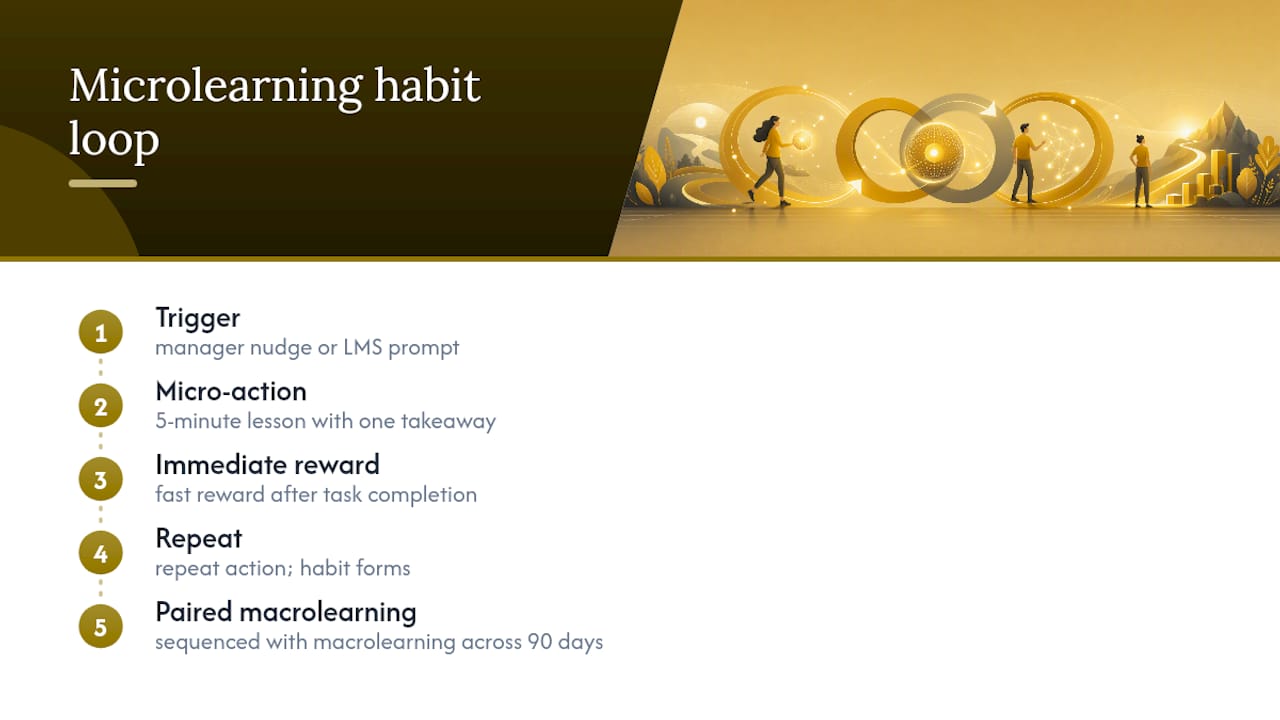
Microlearning shortens time-to-first-win by design. A five-minute lesson with a clear takeaway gets someone to a completed, meaningful action faster than a 45-minute compliance module ever will, and that early win is what determines whether someone comes back voluntarily. Behavioral design tactics, small nudges, micro-goals, and immediate reinforcement after a completed task, work because they mirror how habits actually form: a trigger, a small action, a fast reward. Microlearning sequenced against macrolearning content tends to lock in retention better than either approach alone, particularly across a 90-day adoption window.
Where most LMS rollouts leave a gap is manager reinforcement. Managers get a dashboard, but rarely get the short, structured nudges that turn a report into a conversation. A microlearning layer built specifically for habit formation can plug that gap by giving managers bite-sized content to share in team meetings and one-on-ones, reinforcing exactly the behaviors the LMS is trying to build.
Where Leaderly Fits Alongside Your LMS Rollout
Your LMS handles the content and the compliance record. What most rollouts miss is the daily reinforcement that turns a completed module into an actual habit, and that's the gap Leaderly AI is built to close.
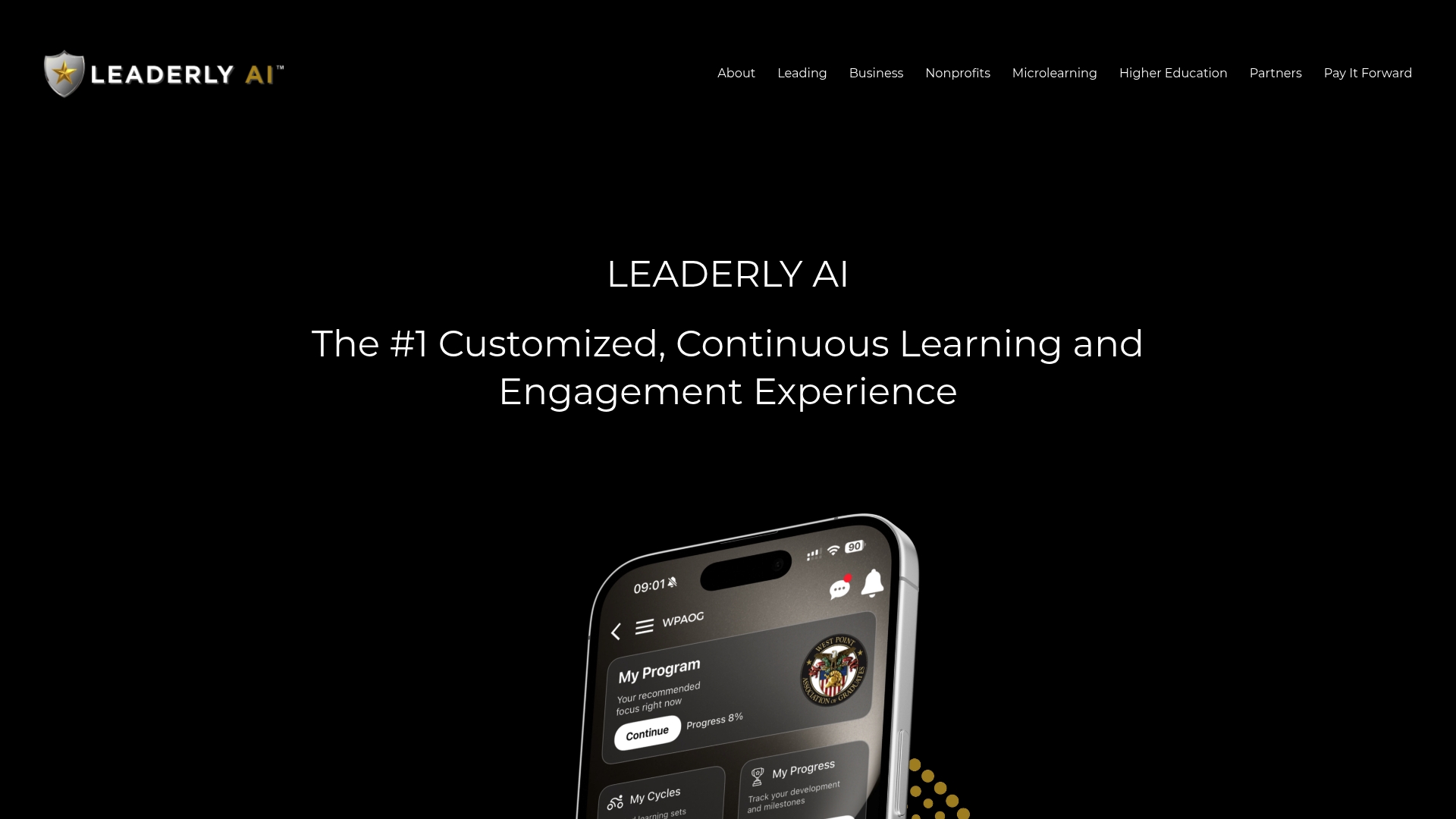
Leaderly runs alongside your existing platform, not instead of it. It delivers microlessons, behavioral nudges, and manager-facing analytics that extend LMS reporting to help track behavior over time. Organizations typically pilot Leaderly during the same 30/60/90 window as their LMS rollout, using it with the same pilot cohort so managers get one reinforced set of talking points instead of two disconnected systems. That overlap is deliberate: a champion network already trained to demo the LMS can just as easily demo a five-minute Leaderly lesson in the same team meeting.
For corporate learning teams, the business-facing leadership engagement program scales this across an entire organization without requiring a manager-only rollout. Higher-education leaders managing shared governance and faculty buy-in can look at Leaderly AI for Higher Education for a version built around academic structures rather than corporate hierarchies. If you're already mapping out your LMS pilot cohort, request a demo to see how a reinforcement layer would slot into the same 30/60/90 timeline.
Sources
For deeper detail on any step above: the 30/60/90 adoption checkpoint framework covers activation-to-optimization phasing in full. MemberClicks breaks down pre-launch communication planning and voluntary enrollment tracking. Training Industry details the five-step migration approach referenced in the phased framework section. LMSPedia offers a complete step-by-step guide to data hygiene, pilot design, and minimum viable catalogs. Ellucian addresses inclusive governance for higher-education transitions specifically.
- LMS implementation checklist — Gainsight
- LMS adoption strategy — MemberClicks
- Migrating an LMS: A 5-Step Approach to Effective Change Management — Training Industry
- LMS Change Management: 2026 Step-by-Step Guide — LMSPedia
- What Is Change Management and Why Does It Matter? — Ellucian (blog)
FAQ
What Are the 5 C's of Change Management?
Definitions vary by framework, but a common version covers clarity, communication, commitment, capability, and culture, each representing a lever leaders pull to move an organization through change. In the LMS context, clarity and communication matter most in the pre-launch phase, while capability and culture show up in how well champions and managers reinforce usage after go-live.
What Are the 7 C's of Change Management?
Some frameworks extend the 5 C's model, typically adding change agents and change communication as distinct categories rather than folding them into commitment or culture. There's no single universally agreed version, so treat any extended C's list as one interpretation among several rather than a fixed standard.
What Is a Realistic LMS Adoption Timeline?
Most organizations should plan for a 90-day adoption window structured around a 30/60/90 checkpoint model: activation in the first 30 days, expansion through day 60, and optimization by day 90. Readiness assessment and pilot testing should happen in the weeks before go-live, not during this window.
How Do You Measure LMS Adoption Success?
Track active users as a percentage of eligible users, completion rate, time-to-first-login, and repeat logins over a rolling 90-day period, segmented by mandatory versus voluntary usage. Voluntary enrollment below roughly 15 percent by day 60 signals compliance-driven usage rather than genuine engagement.
Can Leaderly Replace My LMS?
No. Leaderly AI is designed to run alongside an existing LMS, adding microlearning-based habit reinforcement and manager-facing analytics rather than replacing content management or compliance tracking. Current pricing and plan details are available directly on the Leaderly site.